

Dropshare Zone
Dropshare Zone is a drop target that appears on your screen as soon as you start dragging a file. Drop the file onto the Zone to upload it with Dropshare.
Dropping a file onto the Zone works the same way as dropping it onto the Dropshare menu bar icon, but the Zone is a much larger target and easier to reach.
Settings
Dropshare Zone is configured in the Dropshare settings under Uploads in the Zone section.
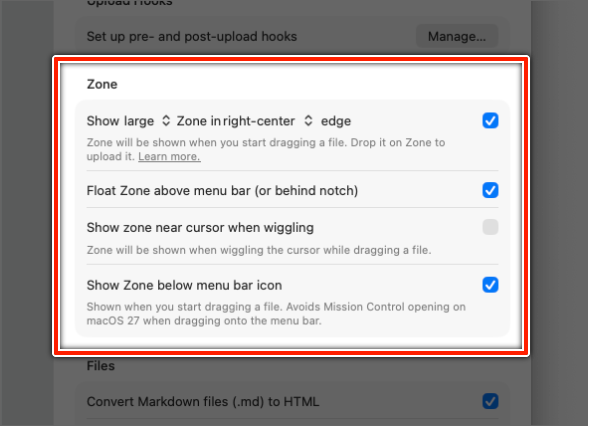

| Setting | Description |
|---|---|
| Show Zone in edge | Shows the Zone when you start dragging a file. Choose between a small and a large Zone and select its position: left, right or top edge of the screen, or the screen center. |
| Float Zone above menu bar (or behind notch) | When the Zone is placed at the top edge, it is shown above the menu bar, or behind the notch on Macs with a notch. |
| Show zone near cursor when wiggling | Shows the Zone next to the cursor when you wiggle the cursor while dragging a file. |
| Show Zone below menu bar icon | Shows a Zone directly below the Dropshare menu bar icon when you start dragging a file. Recommended on macOS 27, see macOS 27 Golden Gate. |
Modifier keys
Hold a modifier key while dropping a file onto the Zone to change how it is uploaded:
- Option ⌥: Upload without a landing page.
- Command ⌘: Choose a connection before the upload starts.